Supported proofing of text in shapes (only in Print Layout view)
November 7, 2025
Word - AI Proofing function
Added an optional function to specify the proofing scope (whole document, current page, specified pages)
November 4, 2025
Added new "AI Proofing" feature
Enables AI proofing of Word documents according to internal style rules
Added an "AI Proofing" button () to the ribbon menu
Removed the "Account" button () from the ribbon menu
August 28, 2025
Outlook - E-mail whole translation function
Added a function to view translation results in a separate window for Windows version of Outlook and web browser version of Outlook.
August 5, 2025
Outlook - E-mail whole translation function
Supported preview display of HTML translation results
Added a function to view translation results in a separate window (Mac version of Outlook only)
July 28, 2025
Translation function
Added support languages for the MT engine "OpenAI":
Albanian
Amharic
Arabic
Armenian
Bengali
Bosnian
Bulgarian
Burmese (Myanmar)
Catalan
Croatian
Czech
Danish
Dutch
Estonian
Finnish
French
Georgian (Kartvelian)
German
Greek
Gujarati
Hindi
Hungarian
Icelandic
Indonesian
Italian
Kannada
Kazakh
Latvian
Lithuanian
Macedonian
Malay
Malayalam
Marathi
Mongolian
Norwegian
Persian (Farsi)
Polish
Portuguese (Portugal)
Punjabi
Romanian
Russian
Serbian
Slovak
Slovenian
Somali
Spanish
Swahili
Swedish
Tagalog
Tamil
Telugu
Thai
Turkish
Ukrainian
Urdu
Vietnamese
July 24, 2025
Translation function
Enabled selection of entire rows, entire columns, or multiple ranges for translation in Excel's selected range translation function
Enabled specification of output destinations for translation results in Excel's selected range translation function
Single selected range translation results: Overwrite the adjacent right or bottom cell
Entire row translation results: Overwrite or insert below the row
Entire column translation results: Overwrite or insert to the adjacent right of the column
2025 May 26
Translation function
Changed the file size limit for document translation function from 4 MB to the following for each MT engine
MT engine
File size limit
Google
20 MB
DeepL
25 MB
May 20, 2025
Translation function
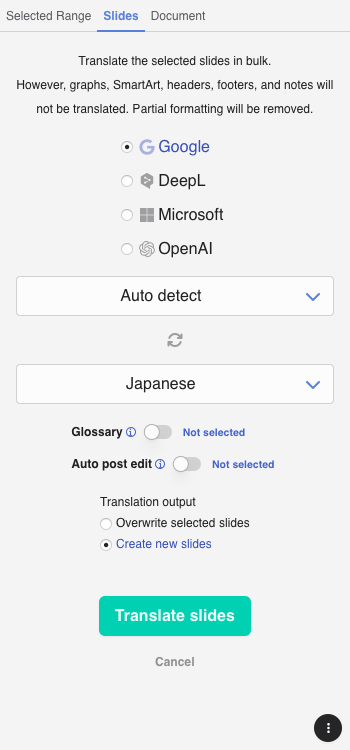
Added a slide translation function to PowerPoint (supported on Office 2024 or later for Windows, Windows version of Office with Microsoft 365 subscription, Mac version of Office, and web browser version of Office)
April 30, 2025
Translation function
Changed the MT engine "OpenAI" model from "GPT-4o mini" to "GPT-4.1"
AI Prompt function
Changed the available models from "GPT-4o mini" and "GPT-4o" to "GPT-4.1" and "GPT-4.1 nano"
February 14, 2025
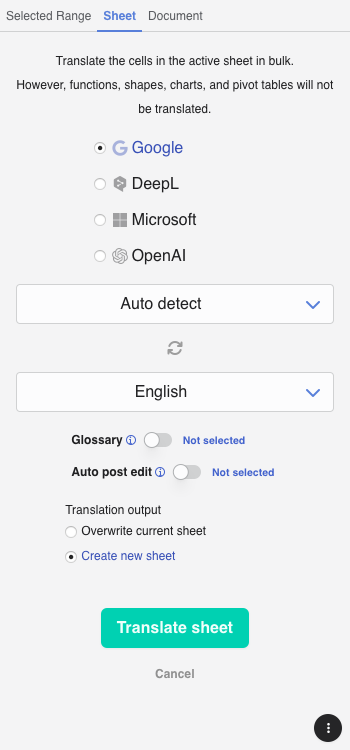
Added a sheet translation function to Excel
January 24, 2025
Added the "AI Prompt" function to e-mails in Inbox for Outlook
January 16, 2025
Translation function
Removed the "Settings" tab
Added a Settings/Help button "⋮" (bottom of the screen)
Changed the position of the "▶ Run translation" button (moved from the right of the translation language to the bottom of the screen)
AI Prompt function
Added an option setting "Run prompts automatically"
Added a Settings/Help button "⋮" (bottom of the screen)
Added a "Run all" button (bottom of the screen)
December 20, 2024
Added “AI Prompt” function for using the generative AI on Office.
November 12, 2024
Added a "Help" button and an "Info" dropdown menu to the ribbon menu
October 21, 2024
Added a feature to enable users to set their own translation instructions (MT prompts) to the MT engine "OpenAI"
Miscellaneous UI improvements
September 13, 2024
Renewed the design of the add-in screen
Supported dark mode
August 20, 2024
Changed the MT engine of OpenAI from GPT-3.5 to GPT-4o mini
July 25, 2024
Users other than translation managers can create and edit private glossaries for themselves in MTrans Online
Users other than translation managers can create and edit private prompt and replacement condition sets for themselves in MTrans Online
July 17, 2024
Added DeepL to the MT engines of the whole document translation function in Excel
July 10, 2024
Added a feature to maximize and minimize the panel sizes for the source text and the translated text respectively.
Added a feature to copy the translated text with formatting preserved in Outlook drafts when the "Translate ignoring formatting" option is not checked.
June 25, 2024
Added the Automatic post-editing feature
May 29, 2024
Changed the MT engine "ChatGPT API" to "OpenAI"
Added a function to set glossaries in the selected range translation screen and the whole e-mail translation screen
Minor UI improvements
January 31, 2024
Added ChatGPT API to the MT engines for the selected range translation function and the whole e-mail translation function
December 15, 2023
Added Microsoft (Microsoft Translator) to the MT engines for the selected range translation function and the whole e-mail translation function
December 07, 2023
Added a feature to apply glossary to translations (excluding document translations)
November 08, 2023
Redesigned the selected range translation screen
Added the ability to specify multiple MT engines in selected range translation
Added the ability to change the text size of the text boxes in selected range translation
September 15, 2023
Changed to share MT engine and language selection settings for "Selected Range" tab and "Document" tab (Word/Excel/PowerPoint) / "Whole E-mail" tab (Outlook)
Changed to keep settings of the last translation after the add-in is closed
September 08, 2023
Added a feature to specify formal and informal tones (polite and plain tone) when translating with DeepL (excluding document translation).
Added a feature to automatically translate without clicking the "Translate" button during the translation of the selected range.
August 25, 2023
Supported translation of some formatting in the Web version of Outlook
August 10, 2023
Supported translation of some formatting in the Mac version of Outlook
July 21, 2023
Supported translation of some formatting in the Mac version of Word
 ) to the ribbon menu
 ) from the ribbon menu